
What is 7notes HD
7notes HD is a digital note tool that helps you quickly record various types of information.
The recorded information is saved locally in 7notes document format.
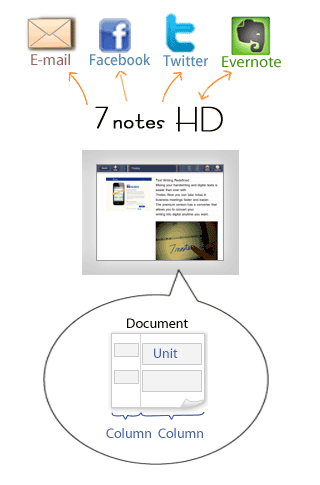
Creating a document
Each document created in 7notes HD consists of one to three columns.
A frame called a "unit" is added to each column, and you can enter text or an image into the frame to create a document.
Handwriting and converting text - mazec
In 7notes HD, the character entry system called mazec helps you handwrite and enter characters.
You can enter handwritten text in the following two modes:
- Convert mode*1
- Your handwritten letters are converted into text.


When you write the first letters*2, words and phrases starting with those letters (predictive text alternatives) are presented. You can select the correct one from those suggestions. If you misspell a word, a list of correctly spelled words (spelling correction alternatives) appears. You can enter the correct word from the list. The entered text is automatically "learned" by the software. The learned text is then presented as alternatives when you write or type the same letters.
- Stroke mode
- Your handwritten letters are entered as they are.
You can handwrite documents in your own style.
 Entering Handwritten Letters - Stroke Mode
When you do not have much time, just write down your idea in stroke mode. You can convert it into text later.*1
You can also type text by using the standard onscreen keyboard. When you are using the onscreen keyboard, as is the case in convert mode, predictive text alternatives and spelling correction alternatives are presented. You can select the one you want to enter.
*1 This function is only available in 7notes HD Premium.
*2 Predictive text alternatives are displayed when three or more letters are written.
Using and sharing documents
Documents created in 7notes HD can be saved, used, or shared with others in the following ways:
- Sending a document by e-mail and using a document in other apps
- You can convert a document into a PDF file or an image file and send it by e-mail or use it in other apps.
- Posting to Twitter or Facebook
- You can post a document directly to Twitter or Facebook.