
Using a Document in Other Apps
You can use your document in other apps, regardless of whether the document is in the original 7notes document format or has been converted into text, PDF, or JPEG format.
* For conversion into text format, the selected text unit is converted. In this case, handwritten letters are not converted.
- To convert the contents of a document into text format, tap to select the text unit you want to convert on the editor screen.
If you are editing that unit, go to step 2. - Tap
 > Send to Application.
 - On the send to application screen, tap to select the format.
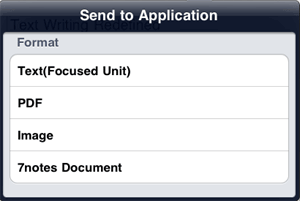
- If you have selected Image in step 3, specify the page you want to convert, then tap Send to Application.
- When the select application screen appears, select the app used for opening the converted file.
* The available apps differ depending on the format you have selected in step 3.
The screen switches to the selected app and the converted file opens.
- You can convert a document into JPEG format to save them in an album.
Tap > Save to Photo Album. - To display a preview of the document converted into PDF format, tap > Preview PDF.