
Entering Handwritten Letters as Text - Convert Mode
Handwritten letters are converted into text and entered.
* This function is only available in 7notes HD Premium.
- On the editor screen, tap the text unit twice to switch it to edit mode.
- If the convert mode screen is not displayed, tap
 in the upper left of the stroke mode screen or onscreen keyboard.
 - On the convert mode screen, handwrite letters in the input area.


At the end of the handwritten letters,
 is displayed to indicate an interval to be recognized as a space. You can insert a space by starting the next letter after an interval larger than the width of this mark. A space is considered a delimiter of words.
 - Tap the converted alternative you want to enter.
Tap ... to display other alternatives.
* Spelling correction alternatives are indicated with a blue underline.
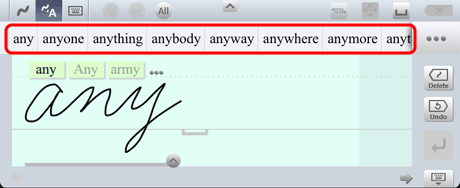
The converted alternative you tap is entered in the text unit.* In this screenshot, converted alternatives are displayed above the input area. Depending on the settings, converted alternatives are displayed near the insertion point.
- You can correct letters that are not recognized in the way you expect.
- When you enter only a specific type of letters, specifying the letter type improves the recognition rate.
Tap *1 in the upper part of the input area to select the type of letters.
*1 The icon differs depending on the selected type of letters.
- When you tap
 instead of tapping an alternative in step 4, handwritten letters are converted into text as they are recognized, and then the text is entered. A space is inserted at the end of the text. In this case, the entered text is not learned.
 - You can select whether to display either predictive text alternatives or spelling correction alternatives as converted alternatives, or not to display any converted alternatives. You can also change the display position of converted alternatives.
- You can adjust the size of the interval to be recognized as a space depending on the way you write.
