
Selecting Another Recognized Alternative
If handwritten letters do not come out the way you expect, you can select another alternative so that the letters are correctly converted.
* This function is only available in 7notes HD Premium.
- On the convert mode screen, check the recognized alternatives displayed above the handwritten letters.
- Tap the correct alternative.
* When "..." is displayed, tap this to display more alternatives.
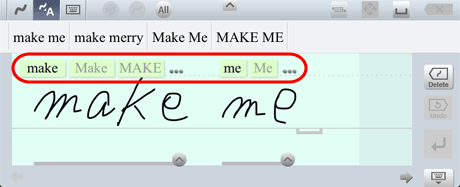
 The converted alternatives change according to the selected recognized alternative.
Recognized alternatives are displayed in one of the following backgrounds depending on the letter type. Characters that look similar to each other can be distinguished by the background color.

(Green) Alphabetic characters 
(Yellow) Numeric characters 
(Gray) Symbols
* Tapping  below the handwritten letters also displays recognized alternatives to select from. If the correct recognized alternative is not displayed, tap Clear and write the letters again.
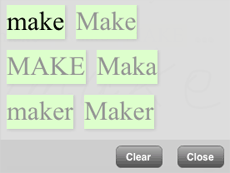
- is displayed for each word. If handwritten letters in an unintended range are recognized as a word, correct the handwritten letters.
