
Converting Handwritten Letters Later - Convert
Handwritten letters you have entered previously can be converted later into text and entered again.
* This function is only available in 7notes HD Premium.
- On the editor screen, tap to select the text unit containing handwritten letters.
- Tap
 > Convert.


The first sequence of handwritten letters in the text unit is displayed for conversion in the input area on the convert mode screen.
* To skip converting the selected letters and to convert other handwritten letters, tap
 .
. - Tap the converted alternative you want to enter.
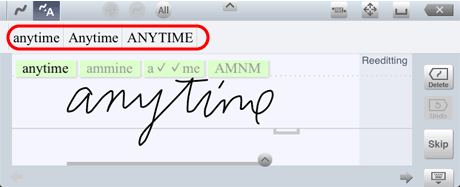
In place of the original handwritten letters, the converted alternative you tap is entered in the text unit.* In this screenshot, converted alternatives are displayed above the input area. Depending on the settings, converted alternatives are displayed near the insertion point.
- You can correct letters that are not recognized in the way you expect.
- You can also convert handwritten letters later by tapping the text unit twice to switch it to edit mode.
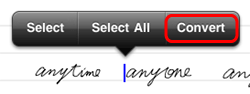
In this case, you can convert the first sequence of handwritten letters after the insertion point.* You can also perform this operation by touching and holding the text unit, then tapping Convert from the selection buttons that appear.
- You can select whether to display either predictive text alternatives or spelling correction alternatives as converted alternatives, or not to display any converted alternatives. You can also change the display position of converted alternatives.
