
Sending a Document to Evernote
You can save your document as a note in Evernote.
* Evernote Enhancement Add-On is only available in 7notes HD Premium.
When you have not purchased Evernote Enhancement Add-On
You can save text in the focused text unit as a note in Evernote. But handwritten letters are not saved.
- On the editor screen, tap to select a text unit.
If you are editing that unit, go to step 2. - Tap
 > Send to Evernote > Text.
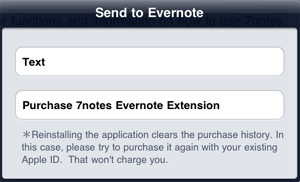
- When a message showing the success or failure of the operation appears, tap OK.
* To purchase the Evernote Enhancement Add-On in 7notes HD Premium, tap > Send to Evernote > Purchase 7notes Evernote Extention.
When you have already purchased Evernote Enhancement Add-On
You can save text in the focused text unit as a note in the selected notebook, but handwritten letters are not saved.
In addition to the text, you can attach a PDF, JPEG, or 7notes document to the note.
You can assign tags to the note when it is newly saved in Evernote.
- On the editor screen, tap to select a text unit.
If you are editing that unit, go to step 2. - Tap > Evernote Enhancements.
- Tap one of the options, and then select tags and formats.
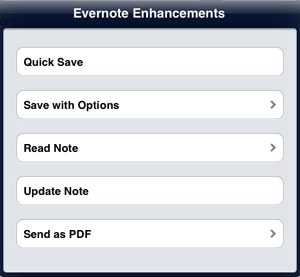


- Overwriting the note
- When you read a note from Evernote, Update Note appears in the options. When you tap this option, the original note is overwritten.
The text focused on is sent.
If a 7notes document is attached to the note, the note is saved with the 7notes document.* After reading a note from Evernote, you cannot overwrite the note after tapping
 to finish editing.
 - Saving a new note (Image and 7notes document)
- Tap Save with Options and select tags and formats to save the note.
You can choose image and/or 7notes document.
The text focused on is sent and the whole document is attached as the selected formats to the note.
You can use Quick Save when you specify frequently-used notebook, tags and formats in Quick Save Settings. - Saving a new note (PDF)
- Tap Send as PDF and select a notebook and tags to save the note.
The text focused on is sent and the whole document is attached as a PDF file to the note.
- When the account and password setting screen appears after step 2, enter your Evernote username and password, then tap Done. If you do not have an Evernote accout, tap Create an account to create a new Evernote account.
If you change your account or password, see the following. - You can change the settings used for Quick Save in step 3.
Tap to display the system settings screen, then tap Evernote > Quick Save Settings to change options.
