
System Settings Screen
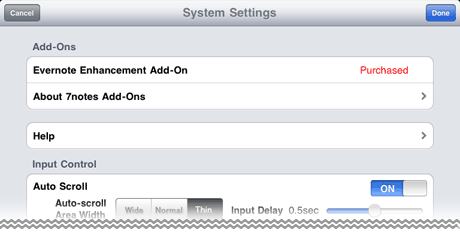
[Add-Ons]
Lists available add-ons for 7notes HD.
When you have already bought the add-on, Purchased*1 is displayed.
When you have not bought it, Purchase is displayed to let you buy the add-on.
* This item is only displayed in 7notes HD Premium.
*1 When you have not added the feature, Download is displayed. You can tap the button to download the add-on.
- Help
- Accesses the Web site of 7notes HD so that you can see the Help.
[Input Control]
- Auto Scroll
- You can select whether to automatically scroll the input area when handwriting letters.
- Auto-scroll Area Width
- When Auto Scroll is on, specify the width of the gray part of the input area.
- Input Delay
- When Auto Scroll is on, specify the length of the scroll delay after letters have been written in the gray part of the input area. Drag the slider to specify the value.
- Auto Feed (for Scroll)
- Select whether the letters you handwrite on the stroke mode screen are automatically entered, or are entered when you tap
 .
.
When this option is turned on, handwritten letters are automatically entered.- Input Delay
- When Auto Feed (for Stroke) is on, specify the length of the delay that occurs before your handwritten letters are entered. Drag the slider to specify the value.
- Word Spacing
- If you insert an interval larger than the specific size between handwritten letters, the interval is recognized as a space. Drag the slider to specify this interval width.
[Alternatives Display]
- Style
- Specify the converted alternatives to be displayed.
- Merged*1
- Both predictive text alternatives and spelling correction alternatives are displayed.
- Predictive Text Only*1
- Only predictive text alternatives are displayed.
- Spelling Correction Only
- Only spelling correction alternatives are displayed.
- None
- No converted alternatives are displayed.
*1 According to the recognition result, alternatives where all letters are in lowercase, all letters are in uppercase, and only initials are in uppercase are also displayed.
- Position
- Specify the position where converted alternatives are displayed.
Tap Handwriting*2 to specify the display position for the convert mode, and tap Keyboard to specify the display position for the keyboard mode.- Cursor Position
- Alternatives are displayed near the insertion point.
- Handwriting Area
- Alternatives are displayed in the upper part of the convert mode screen or onscreen keyboard.
*2 This item is only displayed in 7notes HD Premium.
[Dictionaries]
- Clear History
- Clears the converted alternatives that have been learned and reverts the converted alternatives to the initial state.
[System]
- Specify in advance the destination, subject, and body of an e-mail used for sending a document.
- Configure the Twitter account used when you send the contents of a document to Twitter.
When your account has already been configured, your account information is displayed. - Configure the Facebook account and log in to Facebook when you send the contents of a document.

- You are not logged in to Facebook.
Tap this button and log in to the account you want to use. 
- Your account has been configured and you are already logged in.
Tap this button to log out.
- Evernote
- Configure the Evernote account used when you send the contents of a document to Evernote.
When your account has already been configured, your account information is displayed.
When you have already purchased Evernote Enhancement Add-On, you can specify formats and tags used to save a note in > Evernote Enhancements > Quick Save.
[PDF/Image Output]
Select whether to output the background image or lines to the document converted into JPEG or PDF format or printed on paper.
- Background Image
- Specify whether to output the background image of the document.
* The background colors of units are always output.
- Lines
- Specify whether to output lines in text units or between columns.
* Lines used as the borders of units are always output.
- Version
- Displays the version of 7notes HD.
- Legal Notices
- Displays the copyright notice of 7notes HD.
- Developer Web Site
- Accesses the 7notes HD Web site.