
Document List Screen
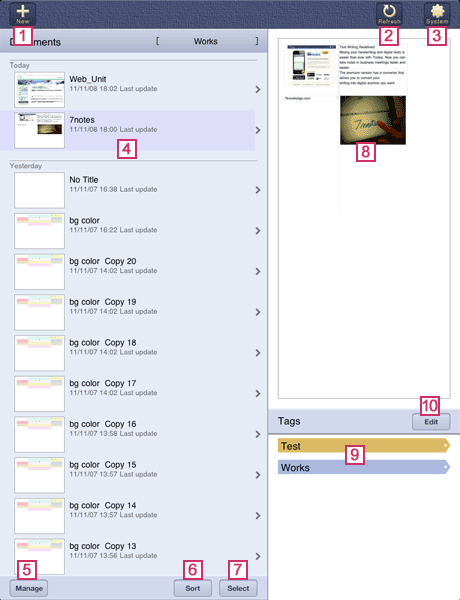


- Creates a new document or adds a document template.


- Refreshes the display on the document list screen.


- Accesses the Help or changes the settings for 7notes HD. When you tap this button, the system settings screen appears.
 Document List
- Lists documents (thumbnail, title, and last modified date).
When you tap a document, the document opens and the editor screen appears.
When there are 25 or more documents, read more records is displayed, together with the total number of documents and the number of displayed documents, at the bottom of the list. When you tap this, the next 25 documents are displayed on the list.
* The documents displayed on the screen are of the selected cabinet. You can find the name of the current cabinet at the top of the document list.
 Manage
- Deletes a document or changes the title of a document.
 Sort
Sort- Sorts the documents in the list according to the title or last modified date.
 Select
- Searchs documents with tags. You can create a cabinet and manage cabinets.
 Preview
- An image of the document selected in the document list is displayed.
You can drag to scroll, or pinch to enlarge or reduce the size of the image.  Tags
Tags- Lists tags that are attached to the currently selected document.
 Edit
Edit- Assigns tags to the currently selected document. You can add or delete a tag.
* In 7notes HD, a message recommending you upgrade to 7notes HD Premium is displayed in the lower right of the screen. Tap the message to access App Store.