
Handling Multiple Languages
mazec supports various languages as add-ons. You can purchase the languages from the Add-on Store by tapping [Add Language] from the mazec language settingsmenu screen.
Available languages are indicated on the mazec screen as follows:
| Code | Language |
|---|---|
| EN | English |
| FR | French |
| DE | German |
| IT | Italian |
| ES | Spanish |
| RU | Russian |
| PT | Portuguese |
| NL | Dutch |
| PL | Polish |
| JP | Japanese |
| CN | Chinese (Simplified) |
| TW | Chinese (Traditional) |
| KR | Korean |
Changing the Language
If you have more than one language, you can switch between them by tapping the language icon on the mazec menu screen.

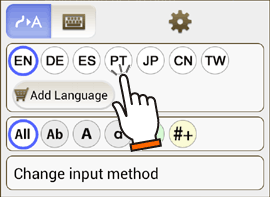
*You can display the mazec menu screen by tapping  on the mazec screen.
* If you are not sure what you have purchased, please tap  . You can see all purchased languages are set to ON in the mazec Settings.
Configuring the Language Settings
Tapping  brings the mazec Language Settings screen.

Showing/Hiding Available Languages
You can set the language option to ON or OFF to show or hide available languages on the mazec screen.
Changing Display Order
- Tap [Change Display Order] on the mazec Language Settings screen.
- You can change the order of languages by dragging
 .
.

You can purchase additional languages by tapping [Add Language] on the mazec Language Settings menu screen.