Selecting Letters
When you are editing a text unit, you can use the following procedures to select the letters to be operated.
* You can select one or more letters. However, depending on the recognition result, handwritten letters may not be selected in the range you expect.
Selecting letters in the standard procedure
- On the editor screen, tap the text unit twice to switch it to edit mode.
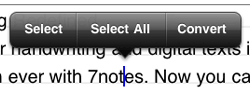
- Touch and hold the text unit. From the selection buttons that appear, tap Select or Select All.
- Drag the grab points
 that are displayed at the beginning and end of the selected range to adjust the selected range.
Selecting letters by dragging
You can quickly select and operate the letters.
- On the editor screen, tap the text unit twice to switch it to edit mode.
- Tap
 in the upper right of the input area to switch it to pressed mode
  .
.
The mode switches to letter selection mode. - Drag the letters or use
 in the upper right of the input area to select the letters.


When you touch and hold
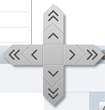
, arrows appear. Then slide your finger to an arrow. The insertion point moves to select the letters. Pressing a double arrow (such as >>) moves the insertion point faster.