
Stroke Mode Screen
On the stroke mode screen, you can enter your handwritten letters as they are.
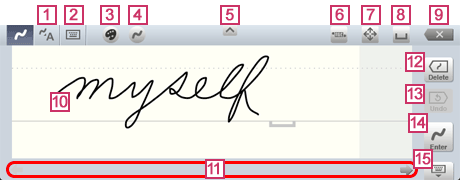


- Switches to the convert mode screen.
* This button is only displayed in 7notes HD Premium.


- Switches to keyboard mode.
This button is not displayed during conversion of letters that were entered previously. 

- Displays the selected color of letters. When you tap this button, you can change the color.


- Displays the selected thickness of letters. When you tap this button, you can change the thickness.

 /
/
- Switches the height of the input area.


- Switches to the mode for selecting the letters in the text unit. In this mode, you can drag or use
 to select the letters to be operated.
Each time you tap this button, you can toggle between this selection mode and normal mode. 
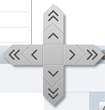
- Moves the insertion point in the text unit.
When you touch and hold this button, arrows appear. When you slide your finger to an arrow, the insertion point moves in the direction of the arrow. Pressing a double arrow (such as >>) moves the insertion point faster.


- Inserts a space at the insertion point.


- Deletes the letter, space, or line feed code before the insertion point.
 Input Area
- Handwrite whatever you want to enter.
The height of one line is from the top edge to the baseline (straight line). You can write letters below the baseline.
At the end of the handwritten letters, is displayed to indicate an interval to be recognized as a space. You can insert a space by starting the next letter after an interval larger than the width of this mark.
When a gray part is displayed on the right-hand end of the input area, handwriting in this area automatically scrolls the input area.  Scroll Bar
- Scrolls the input area.


- Deletes the latest stroke in the input area. When you touch and hold this button, the button becomes
 . In addition, the following buttons appear, providing more deletion methods:
 Deletes all strokes.
 Deletes a group of strokes (for example, one letter or word).

- Restores what was written in the input area before the last delete operation.
When nothing is currently written in the input area, the last contents that were written in the input area is restored. 
 or
or 
- When you tap , the letters written in the input area are entered in the text unit.
When nothing is written in the input area, this button becomes. When you tap , a line feed code is inserted at the insertion point. 

- Closes the stroke mode screen to finish editing of the text unit.
You can drag the icon to move the screen up and down in iOS 5.