
Using a Document Template
When you want to repeatedly use documents as templates, register those documents as document templates. This eliminates the need to enter or specify the same information, helping you quickly create a document.
Saving a document as a document template
- On the document list screen, select the document you want to register as a document template.
- Tap
 .
. - On the create a new document screen, tap Manage Document Template.
- On the manage document template screen, tap Save as Document Template.
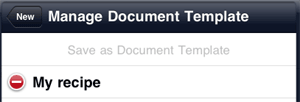
The selected document is registered as a document template and becomes available on the create a new document screen.
Deleting a document template
Deleting a document registered as a document template deletes the document template. To delete only the document template, use the following procedure:
- On the document list screen, tap .
- On the create a new document screen, tap Manage Document Template.
- On the manage document template screen, tap
 on the left of the document template you want to delete, so that the mark changes to
  .
. - Tap Delete.
- The registered document and document template are correlated with each other. Changes you make to the document or title are also applied to the document template. When you copy a document registered as a document template, the copy is also automatically registered as a document template.