
Sorting Documents
On the document list screen, you can sort documents according to the title or last modified date.
- On the document list screen, tap Sort in the bottom area of the document list screen.
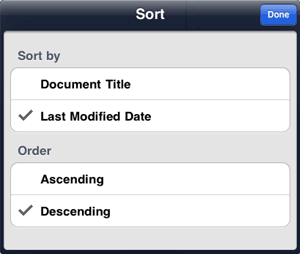
- In Sort by on the sort screen, tap to select the item according to which the documents are sorted.
- In Order, tap to select Ascending or Descending.
If you have tapped Last Modified Date in step 2, select Descending to sort the documents in new-to-old order, or select Ascending to sort them in old-to-new order.
- Tap Done.
The documents are sorted.