Registering Converted Alternatives English / Japanese
Register words that are frequently used or difficult to convert as converted alternatives so that you can enter them easily.
If you register short input text for a long word or phrase, you can quickly enter the word or phrase.
You can register up to 500 words for each language.
- Tap
 to open mazec setting app.
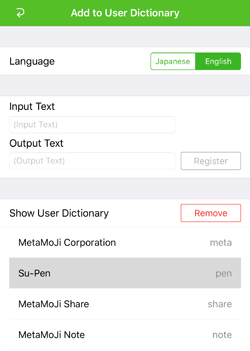
 - Tap Add to User Dictionary.
- When you have purchased Japanese Language Package, select language.
- Enter text in Input Text.
- Enter a word or phrase you want to display as an alternative in Output Text
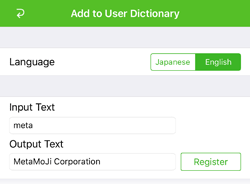
- Tap Register.
When you write the text entered in step 3, the word or phrase entered in step 4 is displayed as a converted alternative.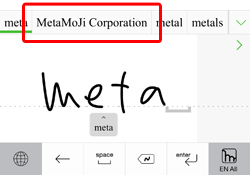
- Tap Add to User Dictionary on mazec setting app to see or delete registered words or phrases on Show User Dictionary.